Focus on usability, security and integrations
December 8, 2025
ACE 32 introduces enhanced sound notifications, real-time agent status updates, favorite canned responses, privacy controls for interaction access, improved voice message handling, and a revamped search/call interface in ACE Interact. ACE Coach gets expanded IVR dialogue flow management and bulk user property copying. The release also delivers strengthened security and AI integration in ACE Knowledge, a modernized ACE Dialer G2 for outbound telephony and a real-time call audio streaming API.
Check out these and more updates in Telia ACE 32 below.
Updates in ACE Interact 32
New and improved settings and sounds for sound notifications in ACE Interact
For users of ACE Interact that also work in other applications, sound notifications are crucial for not missing important events, even if the browser tab with ACE Interact is not in focus.
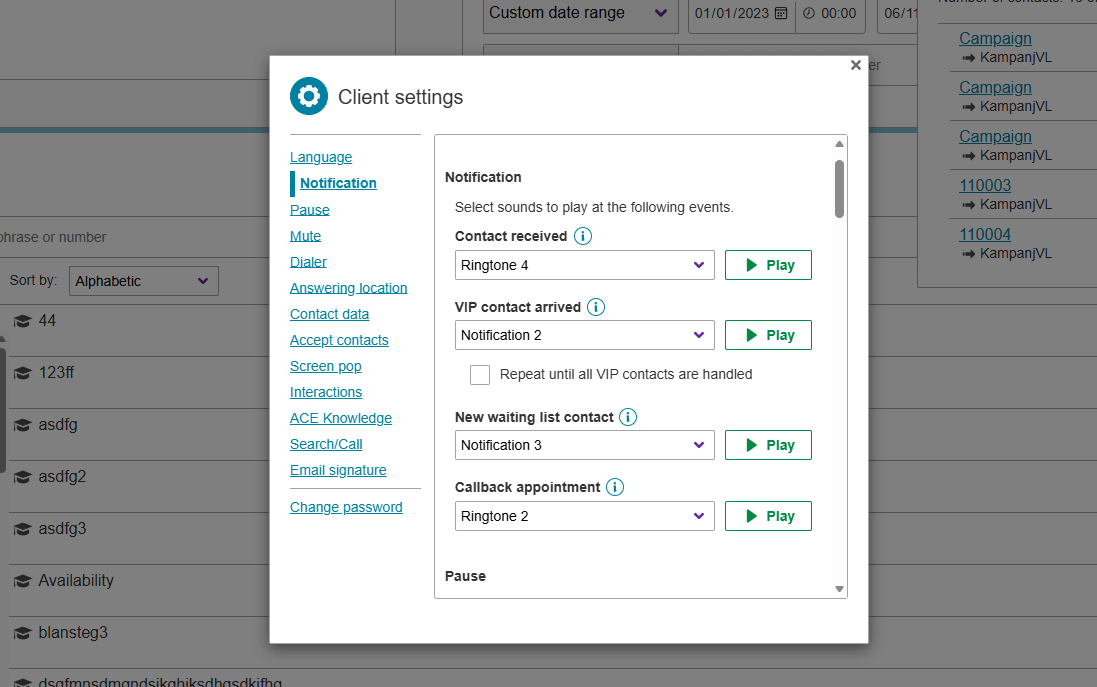
In ACE Interact 32, the client settings for sound notifications are improved with new options and the selection of sounds is extended and modernized in close collaboration with existing customers. The events for which you can activate sounds are:
- Contact received
- VIP contact arrived
- With the option to repeat sound until all VIP contacts are handled
- New contact in a waiting list that you serve
- Time for a scheduled callback appointment
The new sounds have a varied duration and are designed to have different levels of urgency so that you can select from gentle to jarring as you see fit.
Note: when updating from an older version of ACE to ACE 32. The previous settings for when to play sounds (or all silent) will be retained, but the actual sounds will be replaced with one of the new ones.
Also, the new sound notification settings are available in the corresponding client settings in ACE Coach 32, where the administrator can push updated settings to all agents if wanted.
Improved agent status overview in ACE Interact
The agent status overview card was introduced in ACE Interact 29. Now, it is updated to bring even more benefit and value to ACE Interact users.
The agent status overview now updates in real time using a new API, offers a cleaner interface, and allows filtering by queue, waiting list and agent status. The view now accurately reflects which agents are actually logged in to specific queues. This way agents can quickly check status of colleagues and whether anyone is available right now and coaches can get a good overview over their team.
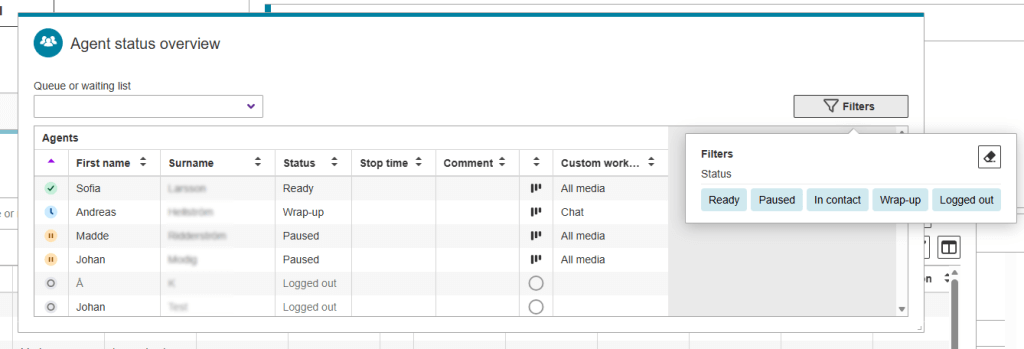
There are two levels of access available “All agents” and “My team” to control what you are allowed to see in the Agent status overview card.
Mark canned responses as favorites to find them faster
Canned responses are common phrases available for agents to use in writing, typically in chat or when composing email and sms. They can contain macros that insert text dynamically, like agent name.
New for canned responses in ACE Interact 32 is that agents can mark canned responses as favorites. Favorites are displayed at the top of the list for easier and faster access when pressing “#” in an input field that supports canned responses. Favorites are personal for each agent and favorites can be added and removed as needed. Simply tick or untick the star by the responses that you want to have at the top. Non-starred responses will be sorted alphabetically as usual.
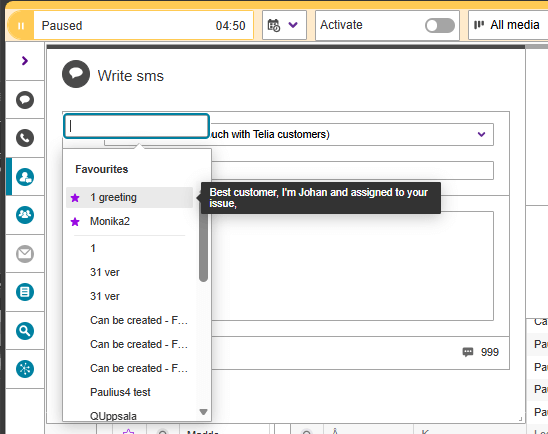
This new feature is useful if you have many saved phrases and saves time as you can avoid having to scroll down in the list for the most used ones.
Let users provide a reason for accessing recordings or reading chats in the interaction archive
For enhanced privacy and better tracking of access to saved interactions, you can now enforce that users must enter a reason for accessing a recording or a chat conversation saved in the interaction archive. Reason is only required for accessing the actual content of a voice or chat interaction, you can still view data for the interaction (timestamps etc.), given that you have the required access rights. The reason stated will be saved, and can be retrieved on demand, for example in an audit or security review.
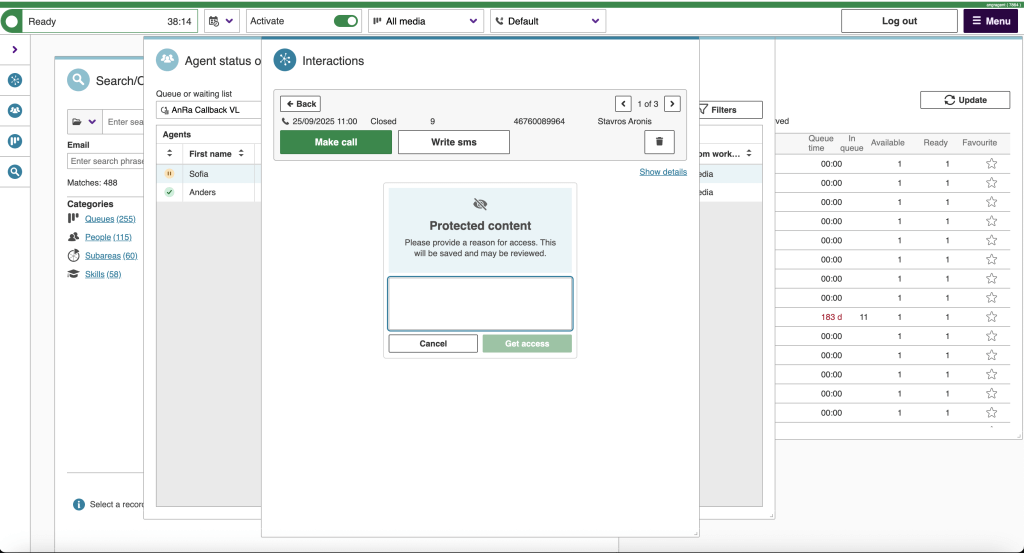
The feature is optional and can be activated separately for access to recordings and chat conversations by changing the value of two system parameters introduced with Telia ACE 32 (requestReasonRecording and requestReasonChat respectively).
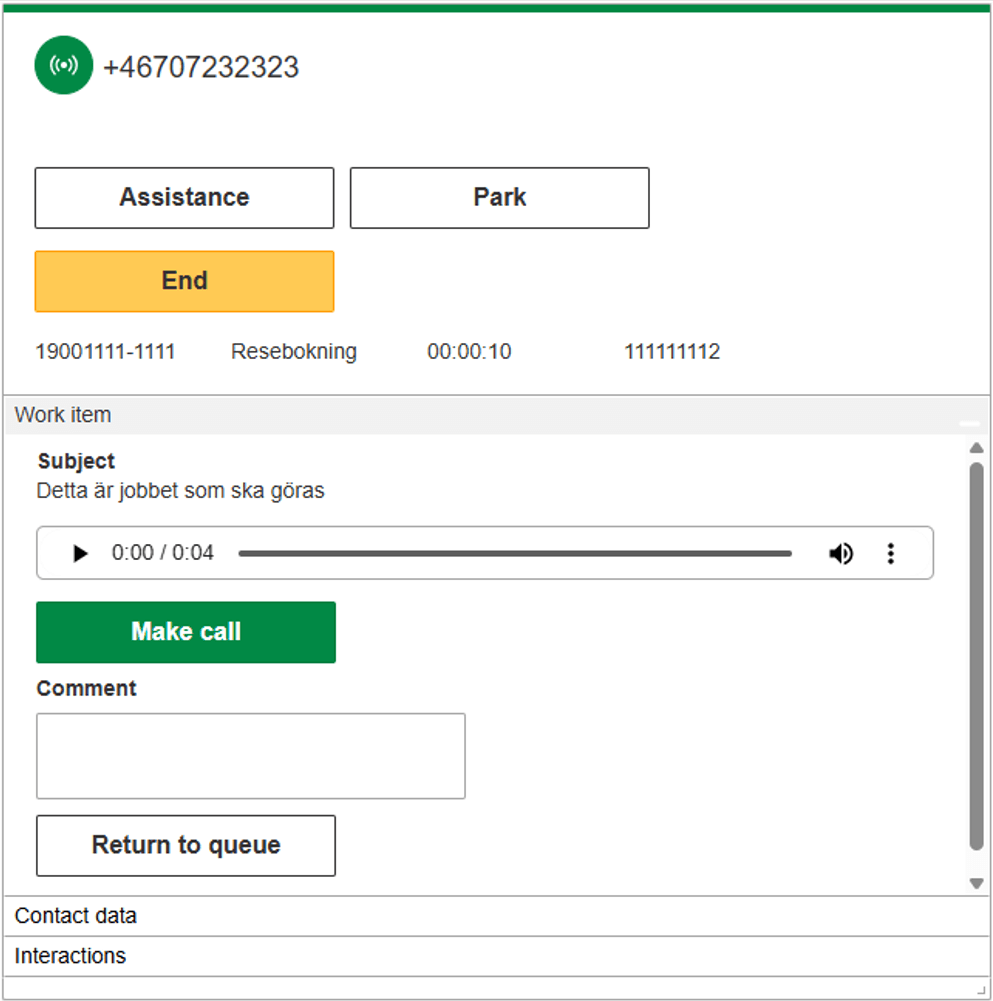
Put voice messages back in queue with a comment in ACE Interact
Another feature requested by customers to support specific workflows is the possibility to easily put a voice message back in a waiting list with a comment after listening to it. This is useful in a scenario where the agent first listening to it decides that the message should be handled by someone else in the organization. They can enter a comment that they have listened to the message and who should pick it next from the waiting list.
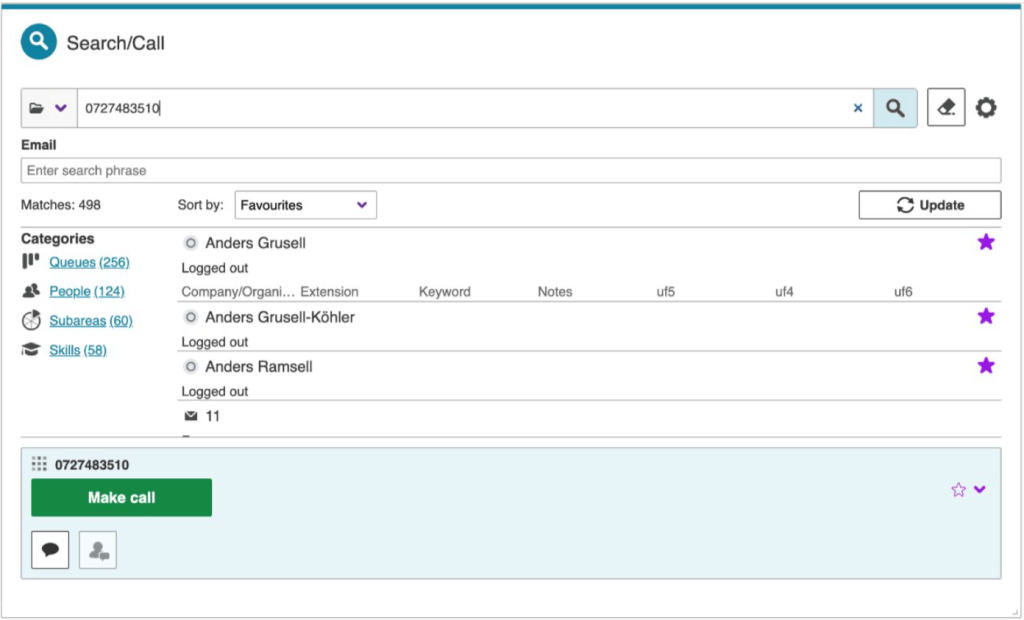
A better way of handling an entered phone number in ACE Interact Search/Call card
A more intuitive way of presenting an entered number and actions in the Search/Call card is introduced in ACE Interact 32. The number entered is now shown directly in the actions bar at the bottom of the Search/Call card (instead of as a virtual snippet in search results like in previous versions of ACE Interact). This way it is clearer what you can do and what number you are dialing.Working with email contacts gets aess function, View Agent Status Overview, to control whether a user role should have permission to see and search in the overview.
Updates in ACE Coach 32
Continued development of IVR Dialogue flow management in ACE Coach
There are several additions to what you are able to view and edit when it comes to IVR Dialogue flows in ACE Coach 32. A noteworthy milestone is that from ACE 32 all exits from objects are clickable. This means that you can follow an IVR flow by clicking exits or “Next object” in the chart view. Most everyday tasks for IVR maintenance, such as updating phrases closing and opening menu options and fine-tuning schedules, can be done using ACE Coach.
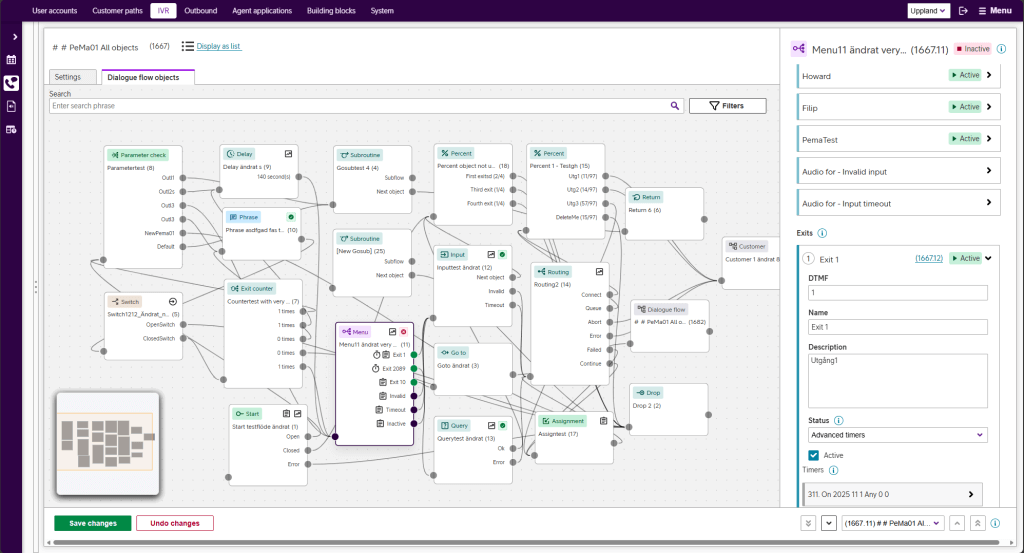
Current status for dialogue flow objects in ACE Coach 32 is outlined below.
For the following type of objects, most or all settings can be configured in ACE Coach 32:
- Menu – for building DTMF menus, including phrase management and timers
- Assignment – assigns values to call parameters
- Start – entry points for flows
- Phrase – plays an audio, fixed or conditional based on call parameter value
- Switch – creates a fork with manual or scheduled control
- Percent – for proportionally distributing calls over exits
For the following dialogue flow objects, all or basic settings are displayed:
- Subroutine – jumps to any start object and executes until a return object
- Go to – for jumping to any start object in the same or another dialogue flow
- Return – marks end of a sub-flow and returns to the last passed Subroutine object.
- Exit counter – used for creating loops and repetitions a desired number of times
- Routing – decides on routing the call to some kind of final destination
- Drop – used for dropping calls at an endpoint in the flow
For the following dialogue flow objects, you can now display basic settings (including link for Next object):
- Input – used for taking DTMF input and save to a call parameter
- Parameter check – routes to different exits based on value of a call parameter
- Delay – control “tempo” in the IVR by introducing a specified length delay
- Query – powerful object to create IVR logic, including integrations with other systems
Also introduced in ACE Coach 32 dialogue flow chart view, there are new icons and visual color cues. These help the user navigate and quickly get an overview of object types, settings and statuses. For example, if an exit has timers for scheduling, it is indicated by a stopwatch icon. There are also icons for assignments, statistics measuring points.
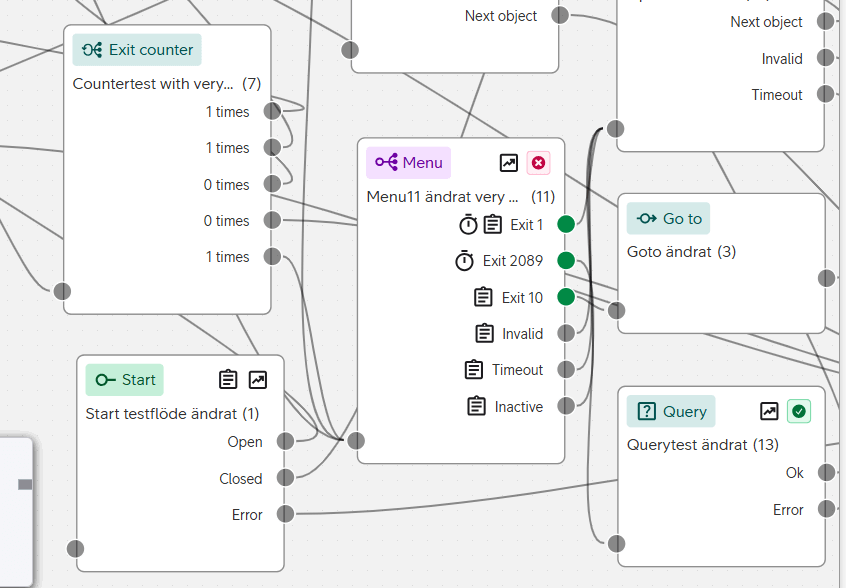
The display of icons can be switched off in Display settings if you prefer a cleaner view. In display settings you can also set whether you want dialogue flows to open in chart or list view.
Finally, if you have moved around objects in the chart view and aren’t happy with the result, there’s now a button on the settings tab to trash the manual positions and revert to the auto-generated view again.
Copy account properties and apply in bulk in ACE Coach user management
A handy new user management feature is introduced in ACE Coach 32. It allows the administrator to copy all properties, except personal details, from a user account and then apply them to one or more selected accounts. This can potentially save a lot of time, for example when managing roles, skills or subareas for a group of users.
The feature is available on the actions bar above the accounts table, and the administrator is guided through the process of selecting and applying to target accounts.
If some of the settings you try to apply in a way that you are not authorized to do for one or more user accounts, this is clearly indicated.
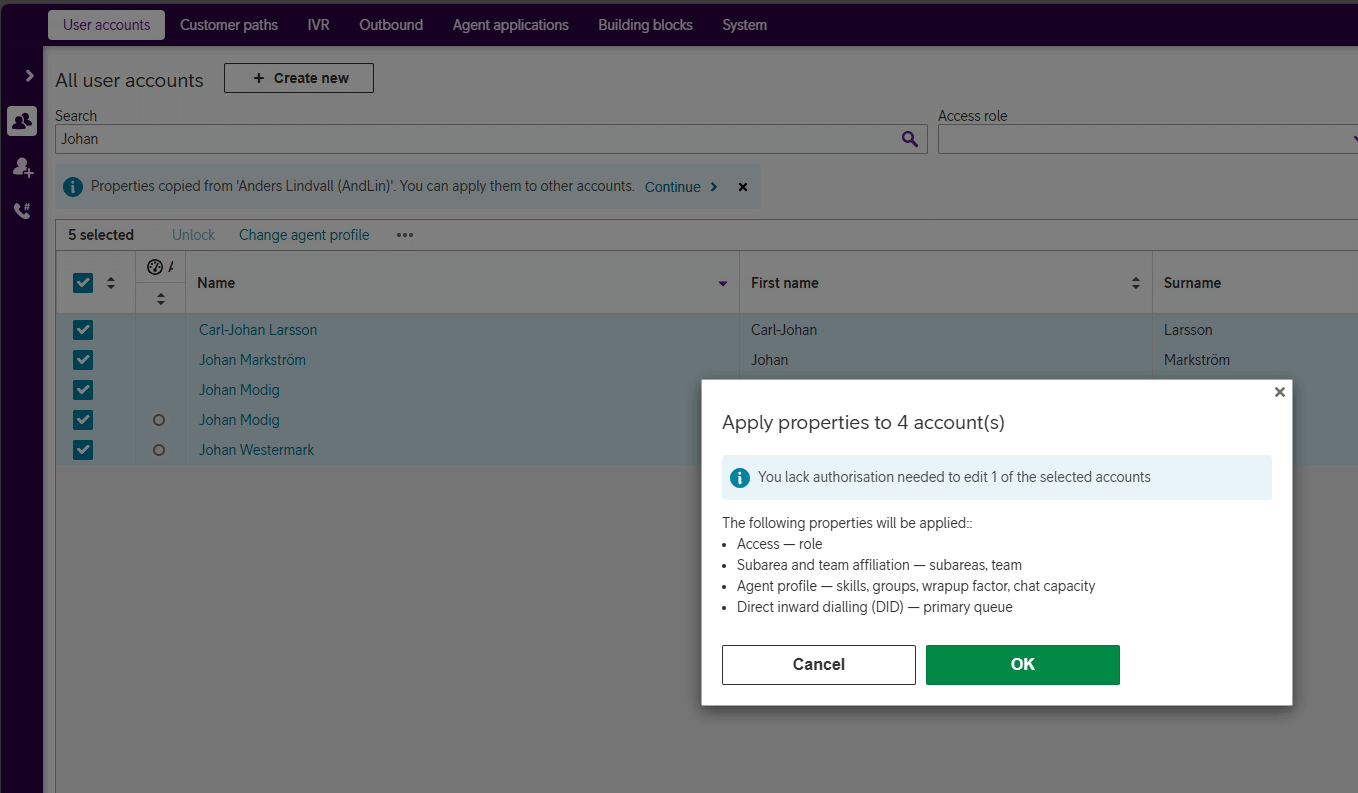
The following properties from the copied account are applied to the selected target accounts:
- Access role
- Agent profile, including:
- groups
- skills
- wrap-up factor
- chat capacity
- Subarea affiliations
- Team membership
- Primary queue for DID (direct inward dialing)
New TTS voices in ACE Coach 32
The text to speech capability available in Telia ACE for creating IVR phrases builds on Google Cloud Platform (GCP).
As AI capabilities and text to speech technology evolves, Google updates the voices available on the GCP cloud platform. Consequently, ACE is updated with new voices and a number of legacy voices based on the older Wavenet technology will be retired. The most recent event (Q3 2025) is the addition of Chirp 3: HD natural sounding generative AI voices.
The new Chirp 3: HD voices will be selectable in ACE Coach 32 and forward.
Updates to ACE Knowledge
Security hardening for Web Service contact method in ACE Knowledge
The Web Service contact method in ACE Knowledge allows for submitting form data in a Knowledge widget. ACE Knowledge passes the submitted data on and gets a reply from a web service outside of ACE Knowledge. This reply can then be displayed to the end user in the Widget. An example could be entering a parcel tracking number in a Knowledge widget and getting current location presented from another service. In effect, ACE Knowledge acts as a user interface and middle-man between the end user and the external web service.

The security measures of this feature have recently been hardened with new options for encryption, integrity and trust that protects the communication from tampering.
Hardening includes:
- HTTPS is enforced for all endpoints
- API Key is supported and sent only in an HTTP header
(API Key in URL is not allowed) - Outbound requests include a JWT (JSON Web Token) so receivers can verify authenticity and integrity
- Secrets for API Key and JWT signing are stored securely, masked in the UI and excluded from logs and exports
ACE Knowledge Link connects your knowledgebase to generative AI capabilities
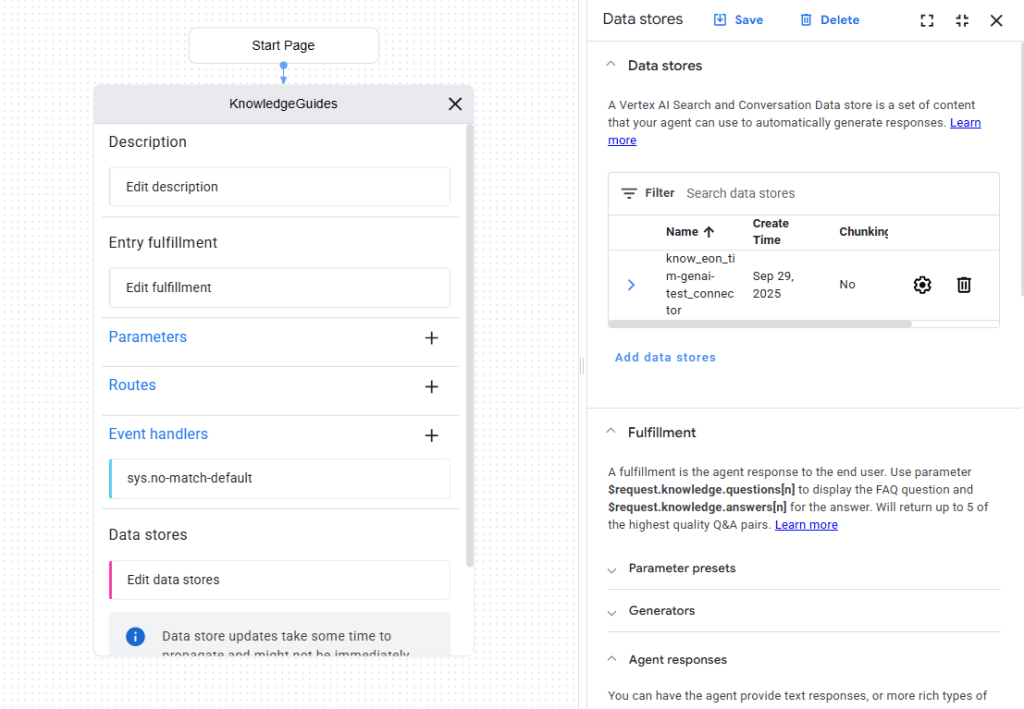
ACE Knowledge Link syncs your knowledgebase texts to a data store, in Google cloud. This allows your knowledgebase to serve as the quality-controlled source of facts for conversational text or voice bots built on Google CCAI and Dialogflow.
Updates to the knowledgebase are automatically synced to the data store in Google Dialog Flow where you, or Telia staff, can design your bots in Google’s suite of tools, using Gemini AI for building premium customer experience.
This is a valuable feature for organizations that have invested time and effort into their knowledgebase and want to take the content to the gen AI era. Also, bots/virtual agents can answer questions in the language they are asked irrespective of language in the knowledgebase.
Updates to ACE Telephony
ACE Dialer G2 modernizes campaign telephony
A dialer enables more efficient outbound telephony by pre-dialing campaign records and connecting the call to an agent only when the recipient has answered the call. This saves agents from waiting for the recipient to pick up.
With ACE 32 we launch the next step of technical modernization and future-proofing of ACE core telephony components. The new ACE Dialer G2 is based on the previously launched Service Node G2 and IVR G2 and is produced in Telia’s own sovereign cloud production environment (but can be used by organizations with G2 components in other production environments).
Dialer configuration is done as previously as part of campaign management in ACE Coach so the switch is transparent to campaign managers.
Updates to ACE APIs
Introducing ACE Audio Streaming API
As a first step towards a comprehensive agent assist suite based on generative AI, ACE 32 brings a real time audio streaming API. This allows organizations to feed audio streams with live phone conversations to their service of choice and build integrations for further processing. Typically, this can be for monitoring, analytics, transcription, text summaries or assisting the agent by showing relevant info from supporting systems.
The streaming API builds on the same secure and robust technology used in ACE Recording G2. A recording is made, but the customer can choose not to save it if only the real-time streaming is wanted.
Please refer to Release notes for Telia ACE 32 and Release Notes for individual sub products for detailed technical information, requirements and considerations. These documents are available on request from your Telia contact.
Important notes for Telia ACE 32:
- See release notes for ACE Business Intelligence for information about perspectives in ACE Statistics; five perspectives/applications.
- ACE Statistics and ACE Business Intelligence can be reloaded and published regardless of the version of ACE Core but see release notes for ACE Statistics backend and ACE Business Intelligence for information about functionality that requires data that was not available until certain versions of ACE Core.
- Recommendation is to use latest version of client applications. Older versions are in some cases possible to use during a transitional period but upgrading as soon as possible is recommended.
- ACE Admin versions 22 or newer.
- ACE Coach: only version 32 is supported.
- ACE Report versions 12.0.0 or newer (). ACE Pulse versions 12.0.0 or newer ().
- (*) Note that, if single sign-on is used, ACE Pulse 21.0 or newer and ACE Report 21.0 or newer are required.
- ACE Interact versions 25.0.3 or newer.
- ACE Monitor versions 24.1.0 or newer.
- When upgrading ACE Database to 32, all users of ACE Coach, ACE Interact and ACE Monitor will automatically start using the new version at next login after upgrade:
- Primary and secondary version is set to “” for ACE Coach
- Primary version for ACE Interact is set to “”. Secondary version is set to “31.*”
- Primary version for ACE Monitor is set to “”. Secondary version is set to “24.*”
- If upgrading from an version older than ACE 30, it is strongly recommended to read release notes for all intermediate versions. For instance, if upgrading from ACE 28 to ACE 32, first read ACE29ReleaseNotes, ACE30ReleaseNotes and ACE31ReleaseNotes in addition to this document.